
The single authoritative starting point for any FHIR genomics implementation is the HL7 Genomics Reporting Implementation Guide, maintained by the HL7 Clinical Genomics Work Group and published continuously at build.fhir.org. For stable production deployments, the published STU release lives at Hl7. All source files, example bundles, and CI-build artifacts are tracked in the HL7/genomics-reporting GitHub repository.
Before writing a single line of mapping code, orient your team around these three reference points:
- Canonical IG (CI-build):
https://build.fhir.org/ig/HL7/genomics-reporting/— always reflects the latest approved content from the Working Group. - Published STU release:
https://hl7.org/fhir/uv/genomics-reporting/— the version to pin for production; check the IG's release page for the current STU number. - GitHub source and examples:
https://github.com/HL7/genomics-reporting/— clone this to access example bundles, test fixtures, and the full IG source.
For terminology and variant identity, your three anchors are the HL7 Clinical Genomics Work Group for IG governance, GA4GH VRS for computable variant representation, and HGNC for canonical gene symbols. Start with the General Genomic Reporting section of the IG, run the provided example bundles through the FHIR validator, and then layer in subdomain guidance (Variant, PGx, Somatic, HLA) as your use case requires.
Key Takeaways
The HL7 Genomics Reporting IG is a data-structure specification, not a workflow standard — your integration layer must handle report delivery, amendments, and EHR routing independently of what the IG defines.
| Point | Details |
|---|---|
| Start with the canonical IG | Pin the published STU from hl7.org/fhir/uv/genomics-reporting/ and use the CI-build only for development. |
| Prioritize three core profiles | Implement GenomicReport, GenomicStudy, and Variant/Genotype Observations before any subdomain-specific profiles. |
| Bind HGNC, HGVS, and VRS identifiers | Omitting canonical identifiers breaks downstream CDS lookups and annotation federation. |
| Validate relationships explicitly | Incorrect hasMember and derivedFrom chains are the most common cause of CDS parsing failures. |
| SignalPGx for PGx labs | SignalPGx provides white-label, FHIR-native PGx reporting with living reanalysis and EHR integration, deployable in 5–7 days. |
Table of Contents
- What does the FHIR Genomics IG actually cover?
- Core profiles to implement first: GenomicReport, GenomicStudy, and genomic observations
- Variant reporting and subdomains: what changes for somatic, PGx, and HLA?
- Terminology and value sets you must use
- How do IG packages and dependencies work?
- Where to find example bundles and how to validate them
- Querying genomic resources: REST patterns and API design
- Practical implementation tips: VCF to FHIR mapping and common pitfalls
- Which IG version should you use in production?
- Canonical repos, standards, and external references
- Mapping pharmacogenomics outputs to the Genomics IG
- A realistic implementation timeline for your first sprint
- SignalPGx accelerates FHIR-based PGx reporting for labs
- Sources
- FAQ
What does the FHIR Genomics IG actually cover?
The Genomics Reporting IG is a data-structure specification. It defines what genomic data should look like inside FHIR resources and how those resources relate to each other. It does not standardize report delivery workflows, amendment lifecycles, or EHR-specific routing logic. That distinction matters enormously for scoping your integration layer: the IG gives you the data model; your team owns the operational plumbing.
The IG organizes its content into five primary sections: General Genomic Reporting, Variant Reporting, Pharmacogenomic Reporting, Somatic Reporting, and Histocompatibility Reporting. New implementers should read General Genomic Reporting and Variant Reporting first. Those two sections establish the core profiles and relationship patterns that every other section builds on.
The IG ships in two forms. The CI-build at build.fhir.org is regenerated automatically from the GitHub source on every approved commit — it reflects the Working Group's current intent but is not a stable contract. The published STU releases at hl7.org are versioned, stable, and the appropriate target for production systems. The IG supports both R4 and R4B; R4B introduced the MolecularDefinition resource and minor profile adjustments, so confirm your target FHIR version before pinning a package. The FHIR Genomics page documents the Clinical Genomics Work Group's full portfolio, including GenomicStudy and MolecularDefinition as emerging core work products.
Core profiles to implement first: GenomicReport, GenomicStudy, and genomic observations
Three profiles form the structural backbone of any genomic report in FHIR. Scope your first sprint around these before touching subdomain-specific profiles.
- GenomicReport (profile on
DiagnosticReport): the report container. It references the patient, the ordering provider, the specimen, and all child Observations. Think of it as the envelope that gives downstream systems a single resource to retrieve. - GenomicStudy (standalone resource in R4B/R5): captures study-level metadata — sequencing method, analysis pipeline, genome build (GRCh37 or GRCh38), and the panels run. In R4 implementations, this metadata often lives in extensions on GenomicReport.
- Genomic Observations: the payload. The IG defines observation profiles for variant findings (
Variant), diagnostic implications (DiagnosticImplication), therapeutic implications (TherapeuticImplication), molecular biomarkers (MolecularBiomarker), and genotype/haplotype calls.
Mapping lab outputs to these profiles:
| Lab Output | Maps To | Key Fields to Populate |
|---|---|---|
| VCF variant row | Variant Observation | component:ref-allele, component:alt-allele, component:genomic-ref-seq, component:exact-start-end, HGVS in component:genomic-hgvs |
| Annotation JSON (gene, consequence) | Variant Observation components | component:gene-studied (HGNC ID), component:molecular-consequence |
| Diplotype/haplotype call | Genotype / Haplotype Observation | component:genotype-name, hasMember links to constituent Haplotype Obs |
| Study metadata (panel, pipeline) | GenomicStudy | analysis.methodType, analysis.genome-build, analysis.referenceGenome |
| Report-level result | GenomicReport | result references to all child Observations, specimen, subject |
Populate subject, specimen, status, and effectiveDateTime on every Observation before worrying about optional components. Those four fields are the minimum for downstream CDS systems to parse a report reliably.
Variant reporting and subdomains: what changes for somatic, PGx, and HLA?
The IG's Variant Reporting section covers germline short variants, structural variants, and copy-number variants using the Variant Observation profile. Each subdomain then adds its own modeling requirements on top of that foundation.
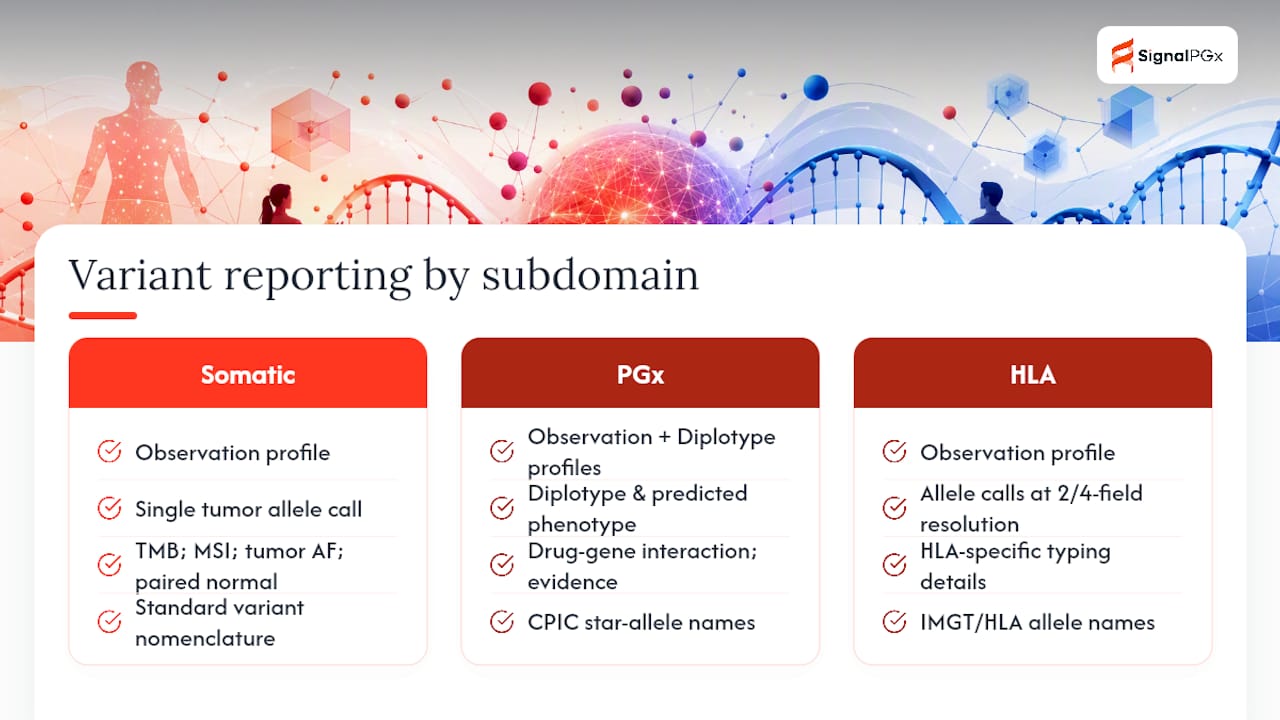
Germline vs. somatic: Germline variants use a single allele representation tied to a constitutional genome. Somatic tumor calls require additional components: tumor mutation burden, microsatellite instability status, allele frequency in the tumor sample, and often a paired normal comparison. The Somatic Reporting section of the IG defines profiles for these tumor-specific findings. When a report contains both germline and somatic findings — common in hereditary cancer panels — use separate GenomicReport instances or clearly differentiated Observation groupings with explicit derivedFrom links to avoid ambiguity in downstream parsing.
Pharmacogenomics: PGx reporting shifts the unit of analysis from a single variant to a diplotype and its predicted phenotype. The PGx section of the IG defines Genotype and Haplotype Observations and a TherapeuticImplication Observation that carries the drug-gene interaction, evidence level, and a link to the relevant guideline (CPIC, DPWG, or FDA biomarker labeling). Diplotype names follow CPIC star-allele nomenclature; phenotype terms should align with CPIC's standardized vocabulary.
Histocompatibility (HLA): HLA typing uses the same Haplotype and Genotype Observation profiles but requires HLA-specific nomenclature (IMGT/HLA database allele names) and often reports at multiple resolution levels (two-field, four-field). The Histocompatibility section of the IG provides guidance on representing ambiguous allele assignments.
Pro Tip: When a single report mixes somatic and germline findings, add a component:sample-description to each Observation and tag it explicitly. CDS systems that consume your report will use that tag to filter findings by origin — without it, a germline pathogenic variant and a somatic variant of uncertain significance can be conflated in downstream logic.
Terminology and value sets you must use
The IG's computable value depends entirely on consistent use of external identifier systems. Binding to the wrong code system, or omitting canonical identifiers, breaks annotation lookups and CDS rule evaluation.
Gene symbols — HGNC: Every component:gene-studied element must carry an HGNC identifier from the HUGO Gene Nomenclature Committee (https://www.genenames.org/). Use the numeric HGNC ID (e.g., HGNC:2621 for CYP2D6), not just the gene symbol string. The HGNC ID is stable across genome builds and annotation tool versions; the symbol alone is not.
Variant nomenclature — HGVS: HGVS expressions (coding, genomic, and protein) go in component:genomic-hgvs, component:coding-hgvs, and component:protein-hgvs respectively. The Human Genome Variation Society's nomenclature standard is the expected binding; use the hgvs.org system URI when coding these components.
Computable variant identity — GA4GH VRS: GA4GH VRS provides a precise, hash-based identifier for a variant that is independent of coordinate system or nomenclature version. Include a VRS _id as an additional identifier on Variant Observations wherever your pipeline can generate one. VRS identifiers are particularly valuable when your system needs to de-duplicate variants across datasets or federate queries across institutions.
LOINC codes for Observations: The IG binds specific LOINC codes to Observation types. Key bindings include:
| Observation Type | LOINC Code | Display |
|---|---|---|
| Genomic variant | 69548-6 | Genetic variant assessment |
| Therapeutic implication | 51963-7 | Medication assessed |
| Diagnostic implication | 53037-1 | Genetic disease assessed |
| Genotype | 84413-4 | Genotype display name |
| Haplotype | 84414-2 | Haplotype name |
ClinVar and dbSNP: Include component:dbSNP-id and component:ClinVar-variant-id where available. These identifiers allow downstream systems to pull current pathogenicity classifications from ClinVar without re-querying your server.
How do IG packages and dependencies work?
The Genomics Reporting IG declares its dependencies in a package-list.json and sushi-config.yaml (for FHIR Shorthand source). Two dependencies appear in every version:
Canonical package IDs:
| Package | ID | Notes |
|---|---|---|
| Genomics Reporting IG (R4) | hl7.fhir.uv.genomics-reporting | Published STU; pin to a specific version for production |
| HL7 Terminology | hl7.terminology.r4 | Required dependency |
| FHIR Extensions Pack | hl7.fhir.uv.extensions.r4 | Required dependency |
| CI-build snapshot | N/A (no stable package ID) | Download from build.fhir.org; do not use in production |
R4 vs. R4B: The published IG targets R4 as its primary base. R4B introduced MolecularDefinition and minor structural changes to GenomicStudy. If your EHR or middleware stack is R4B, verify that the specific IG version you are pinning explicitly declares R4B compatibility — not all STU releases do. The safest path for R4B systems is to test against the CI-build and watch the Working Group's release notes for an R4B-compatible STU.
To pin packages for production, add explicit version constraints to your package.json or FHIR validator configuration. Never reference a CI-build package ID in a production manifest; CI-build content changes without a version bump.
Where to find example bundles and how to validate them
The HL7/genomics-reporting GitHub repository contains example resources and bundles under the input/examples/ directory. The IG site itself renders these examples inline on each profile page, but the raw JSON/XML source in GitHub is what you want for validation runs.
Start with these examples:
Bundle-CG-IG-HLA-1.json— HLA typing report bundle; good for testing relationship modeling.Bundle-oncologyexamples-r4.json— somatic oncology report; covers tumor mutation burden and therapeutic implications.- Any
DiagnosticReport-*example tagged as aGenomicReport— run these first to confirm your validator setup is correct before testing your own mappings.
Validation checklist:
| Step | Tool / Command | What to Check |
|---|---|---|
| Install packages | FHIR Validator CLI (validator_cli.jar) | Confirm hl7.fhir.uv.genomics-reporting, hl7.terminology.r4, and hl7.fhir.uv.extensions.r4 are cached |
| Run IG example | java -jar validator_cli.jar Bundle-example.json -ig hl7.fhir.uv.genomics-reporting | Zero errors on an unmodified IG example confirms your environment is correct |
| Run your bundle | Same command with your output | Review errors by severity; fix errors before warnings |
| Check relationships | Manual review or custom script | Confirm every Variant Obs is linked via hasMember from GenomicReport.result |
| Terminology validation | Validator with -tx flag pointing to tx.fhir.org | Verify LOINC and HGNC codes resolve |
Pro Tip: Run the unmodified IG example bundles through your validator before touching your own data. If an unmodified example fails, the problem is your environment (missing packages, wrong FHIR version), not your mapping code. Fix the environment first.
Querying genomic resources: REST patterns and API design
The IG defines a set of named operations that implementers should use instead of constructing resource-intensive custom queries. The two most commonly needed are $find-subject-variants and $find-subject-dx-implications. Both accept patient and gene parameters and return pre-filtered results, reducing the payload size compared to a broad Observation?subject=Patient/123 search.
For basic REST search, the most useful parameter combinations are:
GET /Observation?subject={patientId}&code=69548-6— retrieve all variant Observations for a patient.GET /DiagnosticReport?subject={patientId}&code=81247-9— retrieve all GenomicReports for a patient.GET /Observation?subject={patientId}&component-code=48018-6&component-value-concept={HGNC-ID}— filter Observations by gene.
Large variant sets (whole-exome or whole-genome) require pagination from the start. Set a _count parameter and implement Bundle.link[next] traversal in your client. For bulk retrieval in analytics contexts, the FHIR Bulk Data Access specification ($export) is more appropriate than repeated paged searches.
Pro Tip: Implement $find-subject-variants on your server before exposing raw Observation search. EHR CDS Hooks integrations almost universally call the named operations first, and having them available from day one prevents a costly retrofit later.
Practical implementation tips: VCF to FHIR mapping and common pitfalls
Getting from a VCF file to a valid GenomicReport bundle involves more than field mapping. The relationship structure is where most implementations break.
- Map each VCF variant row to a
VariantObservation. Populatecomponent:ref-allele,component:alt-allele,component:exact-start-end, andcomponent:genomic-ref-seq(using the RefSeq accession for the reference sequence). Addcomponent:genomic-hgvsfrom your annotation tool's output. - Add HGNC IDs to every variant. Pull the HGNC numeric ID from your annotation pipeline and populate
component:gene-studied. Do not rely on gene symbol strings alone. - Include VRS identifiers where your pipeline supports them. Add the VRS
_idas anObservation.identifierwith systemhttps://vrs.ga4gh.org. - Build
GenotypeandHaplotypeObservations for PGx calls. Link constituentHaplotypeObservations to the parentGenotypeObservation viahasMember. LinkTherapeuticImplicationObservations to theGenotypeviaderivedFrom. - Assemble the
GenomicReport. Reference every top-level Observation (Variants, Genotypes, Implications) inDiagnosticReport.result. Do not nest Observations insideresultif they are already linked viahasMemberfrom a parent Observation — this creates duplicate traversal paths. - Validate
hasMemberandderivedFromchains. Incorrect relationship modeling is the most common cause of downstream CDS failures. Write a unit test that traverses every relationship in your bundle and confirms no dangling references. - Test with large VCF files. Whole-exome outputs can contain 80,000+ variant rows. Confirm your serialization, bundle chunking, and server ingestion handle that volume before go-live.
Pro Tip: Write a relationship-graph unit test that starts from GenomicReport and walks every result, hasMember, and derivedFrom reference. Any Observation not reachable from the report root will be invisible to CDS systems that traverse the graph rather than query by type.
Which IG version should you use in production?
The CI-build at build.fhir.org is appropriate for development, exploratory testing, and staying current with Working Group decisions. It changes without a version bump and should never be the pinned target in a production manifest.
Published STU releases carry a version number (e.g., STU 3.0.0) and a maturity level. The Genomics Reporting IG is currently at Trial Use maturity, meaning the profiles are stable enough for production implementation but may still receive breaking changes between STU releases. Plan for a version-upgrade cycle of roughly 12–18 months aligned with HL7's publication cadence.
The IG's GitHub repository tracks release milestones and open issues. Subscribe to repository notifications to catch breaking changes before they reach a published STU. When a new STU drops, run your full validation suite against the new package in staging before updating your production manifest. Keep the previous package version available for rollback; FHIR package managers support side-by-side version installs.
Canonical repos, standards, and external references
Every implementation team should bookmark and cite these resources in their project README:
- HL7 Genomics Reporting IG (CI-build): Build
- HL7 Genomics Reporting IG (published STU): Hl7
- HL7 Clinical Genomics Product Brief: Hl7
- GitHub source and examples: Github
- FHIR Genomics overview (v6 ballot): Build
- GA4GH VRS: Vrs
- HGNC (HUGO Gene Nomenclature Committee): Genenames
- HGVS nomenclature: hgvs.org
- LOINC: Loinc
Mapping pharmacogenomics outputs to the Genomics IG
PGx reporting has a distinct data model compared to germline variant reporting, and the differences are consequential for interoperability. The unit of clinical meaning in PGx is the diplotype-phenotype pair, not the individual variant. A CYP2D6 *1/*4 diplotype maps to an "Intermediate Metabolizer" phenotype, and that phenotype drives the TherapeuticImplication Observations that CDS systems consume.
Your PGx-to-FHIR mapping should follow this structure: one Haplotype Observation per called star allele, linked via hasMember into a Genotype Observation carrying the diplotype name, which in turn links via derivedFrom to a TherapeuticImplication Observation for each relevant drug. The TherapeuticImplication should carry the drug name (RxNorm code in component:medication-assessed), the predicted phenotype, the evidence level (CPIC A/B/C/D or equivalent), and a URL to the guideline in component:genomic-source-class.

For labs delivering PGx results into EHRs, the integration checklist extends beyond the FHIR data model. You also need to handle report metadata (ordering provider, accession number, report date), evidence tagging (which guideline version was used), and living reanalysis support — the ability to update a TherapeuticImplication when CPIC or DPWG revises a recommendation without re-running the sequencing assay. The genotype-to-phenotype mapping step is where most PGx implementations introduce errors; validate each diplotype-to-phenotype translation against the current CPIC allele definition tables before populating Observations.
Pro Tip: Tag every TherapeuticImplication Observation with the guideline version used (e.g., CPIC CYP2D6/codeine guideline v1.3) in an extension or note element. When living reanalysis updates a recommendation, you can query by guideline version to identify which patient reports need re-evaluation without re-running the full pipeline.
A realistic implementation timeline for your first sprint
Most lab and integration teams underestimate the scope of a first FHIR genomics implementation by focusing on the mapping code and ignoring the environment setup and relationship validation work. A realistic 6–8 week proof-of-concept looks like this:
Weeks 1–2: Pin your package versions, set up the FHIR validator with all dependencies, and run the IG's unmodified example bundles to confirm your environment. Identify your target subdomain (germline variant, PGx, or somatic) and read the corresponding IG sections in full.
Weeks 3–4: Implement VCF-to-FHIR mapping for a representative subset of your lab's output (50–100 variants). Write unit tests for relationship chains (hasMember, derivedFrom). Run your output through the validator and resolve all errors.
Weeks 5–6: Expand to a full report bundle, including GenomicReport assembly and all required Observations. Test ingestion into your target EHR or middleware in a staging environment. Identify terminology gaps (missing HGNC IDs, unresolved LOINC codes) and resolve them.
Weeks 7–8: Performance test with a realistic VCF file size. Implement pagination and bulk retrieval if needed. Conduct a clinical review with your medical director or informatics lead to confirm that the structured output matches the intended clinical meaning of your lab's reports.
Common blockers at each stage: terminology gaps (HGNC IDs missing from your annotation pipeline) in weeks 3–4, relationship modeling errors surfaced by the validator in weeks 5–6, and EHR ingest schema mismatches in weeks 7–8. Involve clinical informatics leadership no later than week 5 — catching a structural modeling decision late is far more expensive than catching it early.
SignalPGx accelerates FHIR-based PGx reporting for labs
Labs that have worked through the IG sections above know that the data modeling is only part of the challenge. The build-vs-buy decision for PGx reporting infrastructure is real: building a compliant, clinically defensible PGx pipeline from scratch typically takes 6–12 months of engineering and clinical informatics effort, plus ongoing maintenance as CPIC and DPWG guidelines evolve.
SignalPGx is built specifically for clinical, molecular, and reference laboratories that need to deliver physician-reviewed, evidence-graded PGx reports through a FHIR-native pipeline without building that infrastructure themselves. The platform handles diplotype-to-phenotype mapping, TherapeuticImplication Observation generation, EHR integration via HL7/FHIR and CDS Hooks, and living reanalysis — automatically updating recommendations when CPIC or DPWG guidelines change. White-label deployment typically goes live within 5–7 days, and the platform is HIPAA and GDPR compliant by design.
For labs evaluating a commercial path, the white-label PGx reporting product page covers integration options and clinical features in detail. To discuss your lab's specific FHIR integration requirements and see a live demo, contact the SignalPGx team at Signalpgx.
Sources
- Home Page - Genomics Reporting Implementation Guide v4.0.0-cibuild
- HL7 Standards Product Brief - HL7 FHIR® Implementation Guide: Clinical Genomics, Edition 3 | HL7 International
- Genomics - FHIR v6.0.0-ballot4
- GA4GH Variant Representation Specification (VRS)
- GitHub - HL7/genomics-reporting
This article is general information, not a substitute for advice from a qualified doctor. Consult a qualified healthcare professional about your own circumstances before acting on anything here.
FAQ
What is an IG in FHIR?
An Implementation Guide (IG) is a formal specification that extends the base FHIR standard for a specific clinical domain, defining profiles, value sets, extensions, and operations that implementers must follow. The HL7 Genomics Reporting IG is the authoritative IG for genomic data exchange in FHIR-based systems.
Are FHIR and HL7 the same thing?
No. HL7 International is the standards organization; FHIR (Fast Healthcare Interoperability Resources) is one of the standards it publishes. HL7 also maintains older standards such as HL7 v2 and CDA, but FHIR is its current-generation API-based interoperability framework and the foundation for the Genomics Reporting IG.
What is the difference between the CI-build and a published STU release?
The CI-build at build.fhir.org regenerates automatically from the GitHub source on every approved commit and is not a stable contract. A published STU release carries a fixed version number and is appropriate for production systems; pin the STU version in your package manifest and test upgrades in staging before promoting.
How does FHIR support genomics data exchange?
FHIR supports genomic information exchange through the Clinical Genomics Work Group's outputs: the Genomics Reporting IG (profiles for variants, implications, and reports), the GenomicStudy resource (study metadata), and MolecularDefinition (precise molecular entity representation). Together these define a computable, interoperable model for lab-to-EHR genomic reporting.